The New CAPFAA Website: How to Log In and Access Members-Only Content

By Stacey Musulin, Assistant Director, CT Community Colleges (and CAPFAA Communications Committee Member!)

When you are on the new CAPFAA website, it is obvious that there have been some changes to the formatting, but have you realized how much more content you can access now? The key is accessing this information is to LOG IN!

If you haven’t already, click the Member Log In button at the upper right of the page.

Type in your email address and password and click the “Sign In” button

  • Note: If you haven’t logged in before or forgot your password, simply click the “Need a Password?” button and a temporary password will be emailed to you.

When you log in, you’ll always be prompted to review your contact information. Please keep this information up to date.

  • If you don’t need to change anything, just click the “Skip” button at the bottom and “Return to the Home Page.”
  • If you want to change your password, click the “Change” link next to the word “Password”
  • After making any changes, click “Save & Continue”

Once you are logged in, you can access any of the following Members-Only content in the Membership sections of the website:

  • While parts of the Membership Directory are public, you must log in see your fellow members’ phone numbers and email addresses. This keeps CAPFAA members’ professional contact information more private than our previous site did.
  • From the top menu, click Membership > Members Only Area to gain access to content only CAPFAA members may see
    • Executive Council and CAPFAA Committee Reports are available for members review in those sections of the site. Note that Council minutes must be approved at the following month’s meeting before they are posted.
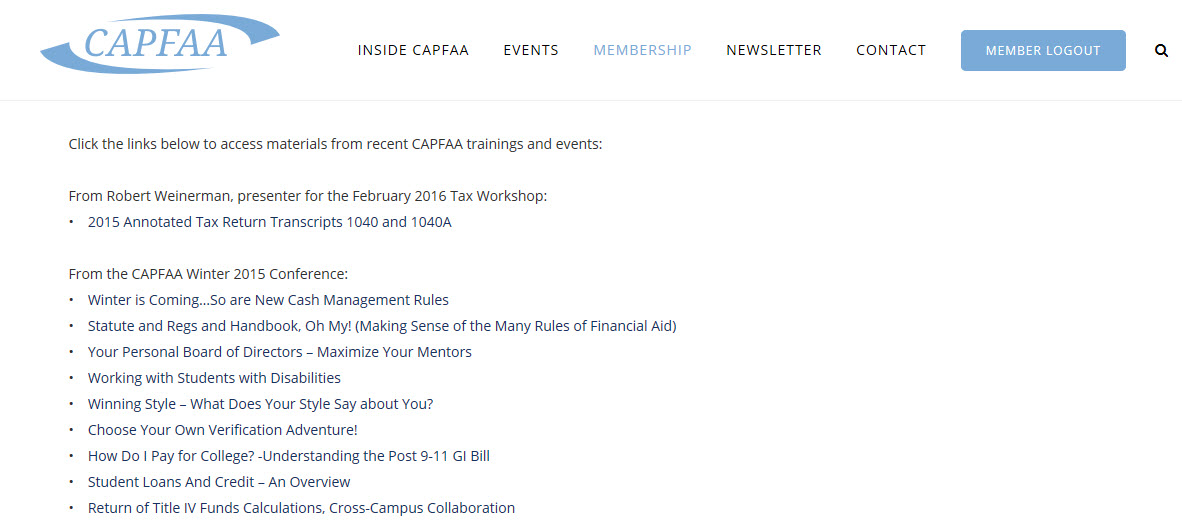
    • Presentation Archives contain information from recent CAPFAA-sponsored trainings. Check out all the PowerPoints from our Winter Conference and the annotated 2015 tax Return Transcripts supplied by Robert Weinerman of Ironbridge, who presented the recent Tax Workshop:

Did you just try clicking on that image above? Well, that’s not going to work because that that is only a snapshot of the actual website! If you really want this information, take advantage of your CAPFAA membership and log in right now!

Nila

Share
Published by
Nila

Recent Posts

Melissa Stephens Named To NCAA Division III Financial Aid Committee

Melissa Stephens, Western Connecticut State University Director of Financial Aid and Student Employment will become…

7 years ago

Reflections on ten years of Financial Aid Day

Wednesday, October 16, 2019 marks the tenth year of celebrating National Financial Aid Day! The…

7 years ago

NASFAA Annual Conference

Registration is now open for NASFAA's Annual Conference June 24-27, 2018 in Austin, Texas  

8 years ago

CAPFAA Annual Business Meeting

CAPFAA's Annual Meeting will be held on Wednesday, June 6, 2018 at the Glastonbury Boathouse!…

8 years ago

Connecting Budget Requests to Institutional Goals

By Dan Dreeves, Director of School Partnerships, Financial Aid TV Conveying the importance of a…

8 years ago

College Financing Under the New Tax Bill: What Happens Now?

by Jennifer Trauman, College Ave Student Loans If you’re in the business of helping people…

8 years ago